

Exporting your users
68 Classifieds allows you to export your users to a csv file or excel spreadsheet. This can be beneficial depending on what goal you are trying to achieve. Some example reasons you might want to do this include:
- Creating a snail mail list
- Creating a contact list
- Creating an email newsletter list
- Creating a holiday mailer
You can export your users by visiting the Administration then clicking the Users tab and finally Manage Users. Toward the bottom of the list of users is an excel icon. See the screen shot below:
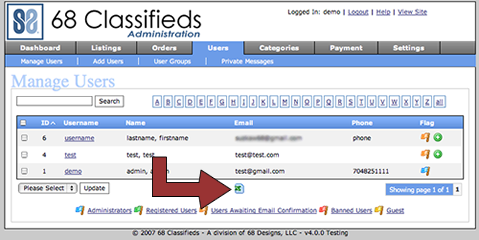
Once you click this all the users will be exported to a csv file.
You can also export specific users based off user group, search term, or by the letter. Once you perform the user search just click that same icon and a list with all the users shown will be generated.
2


Comments
Comments
Blog Categories
Search The Site

Wow, this is a really nice feature I overlooked. It will come in handy in the future.
I was thinking that this is something hard to spot. Hopefully it will be useful for everyone.