

Archive for the ‘Tips & Tricks’ Category
Database Backup with PhpMyAdmin
Most web hosts will give you access to manage your database through a script named phpmyadmin. In this tutorial I will go through the steps to make a backup of your database.
Read more…


Google AdSense On SSL Pages
Google Adsense is an excellent advertising program that allows you to get paid when people click ads on your site. Integrating Google Adsense into your 68 Classifieds site is very simple and just requires you to get their javascript code and paste it into a template file.
Although it is easy to integrate you should keep in mind that it currently does not support SSL invocation. Meaning if you place it on a page that is accessed by SSL you will get a security warning saying the page may not be secure.
Although you may place the AdSense ad code on a page using Secure Socket Layers, we do not currently offer an https version of the AdSense ad code at this time. Therefore, you may see a message asking for confirmation to load all items on the page when placing the AdSense ad code on secure https pages.
The only way to get around this is to add a Smarty if statement around the javascript code like this:
{if $smarty.server.SERVER_PORT != '443'}
//place ad code here
{/if}
What this does is check what port your website is currently on (port 443 is generally SSL) and if it is not an ssl page then display the ads. If you are not using an SSL then you do not need to make any changes and can run the ads as normal.
Exporting your users
68 Classifieds allows you to export your users to a csv file or excel spreadsheet. This can be beneficial depending on what goal you are trying to achieve. Some example reasons you might want to do this include:
- Creating a snail mail list
- Creating a contact list
- Creating an email newsletter list
- Creating a holiday mailer
You can export your users by visiting the Administration then clicking the Users tab and finally Manage Users. Toward the bottom of the list of users is an excel icon. See the screen shot below:
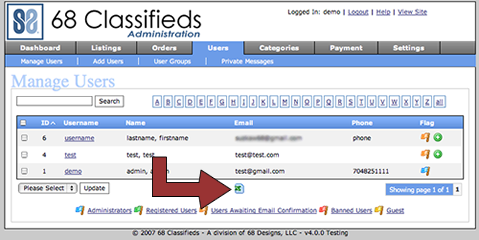
Once you click this all the users will be exported to a csv file.
You can also export specific users based off user group, search term, or by the letter. Once you perform the user search just click that same icon and a list with all the users shown will be generated.
Using RSS to stay in contact
Did you know 68 Classifieds allows you to publish an rss feed of your listings? You can use RSS feeds to help your site stay in front of users and help get repeat traffic to your site.
Some of the advantages of RSS are:
- Private - Users do not have to subscribe by email and do not have to worry about receiving spam.
- Instant - As soon as a new listing is added the rss feed is updated. Your users will always see the latest listings.
- Secure - RSS can not carry attachments or viruses.
- Not Blocked - You do not have to worry about getting black listed and you do not have to worry about the listings finding the bulk mail folder.
- Feed Readers - Users can read the rss feed in a number of applications including, Gmail, Flock, My Yahoo, their desktop, and many more places.
Now, lets look at some other simple promotion tips:
- Auto Discovery - By adding one line to your layout file, you can allow browsers to auto-discover your rss feeds. For more information please visit: http://www.w3.org/QA/Tips/use-links
- Submit to RSS aggregators. - By submiting your rss to aggregator sites your content will be picked up and linked to by other sites.
- Use Pinging - Pinging allows you to submit your rss feed to popular sites like Technorati, Feedster, etc. You can use a service like Ping-o-Matic
For more information on the different settings and how to integrated RSS feeds with 68 Classifieds please refer to the knowledge base.
Blog Categories
Search The Site
