
|
|
|
You should have your browser window open and viewing the http://www.yoursite.com/install/index.php page. Click on the "Proceed with installation" button.
Read through the license agreement and, if you agree, click on the "Proceed with Installation" button.
The next page you see should look like this...
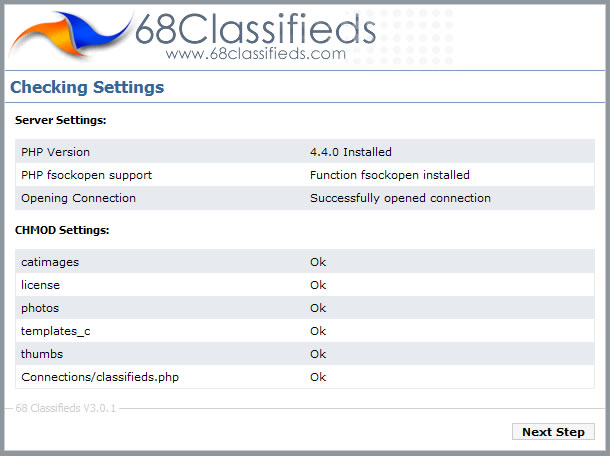
The page checks to see whether or not the server has the correct settings and whether or not your 5 folders and 1 file have been CHMOD'ed successfully. If you are receiving an error in the "Server Settings" section, please contact us for further information. If you are receiving errors in the CHMOD settings area, please visit the section in this user manual entitled (****INSERT LINK HERE****) "CHMOD your folders and files" to resolve the errors. Refresh the page once you have changed the permissions of the folders and files.
When all the server and CHMOD settings are correct, a button named "Next Step" appears. Click this button to continue to the next step.
The next page contains a form where you can enter your database information:
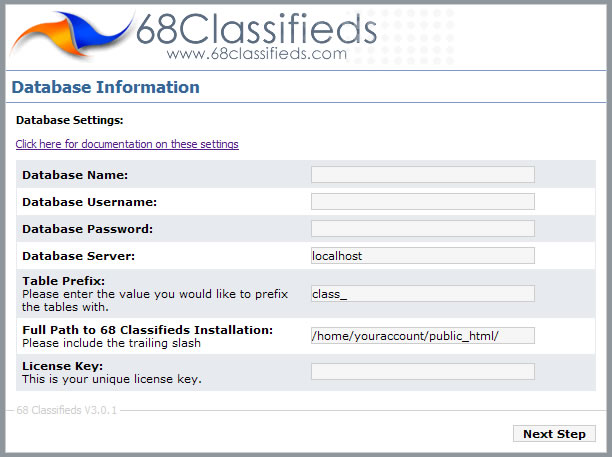
Database Name: This is what you named your database. Please note: some hosts will append your account name to the database name that you provided (for example "myaccount_classifieds"). Enter the database name without quotes or spaces.
Database Username: This is the username of the person who has access to the database. This value was provided by you when the database was created. Please note: some hosts will append your account name to the username (for example "myaccount_username"). Enter the username without quotes or spaces.
Database Password: This is the password that you provided when the database was created. Normally, hosts DO NOT append the account name to the password. Enter the password that you created without quotes or spaces.
Database server: This is the database server location. A vast majority of hosts have the database server running on the same computer and, therefore, "localhost" (without quotes) is the correct value.
Full Path to 68 Classifieds Installation: This value is provided and shouldn't need to be changed.
License Key: Enter the license key that you have been provided. The license key can be retrieved by logging in at http://www.68classifieds.com/members/
Click the "Next Step" button. Your information will be verified and a test will be performed to verify that a connection to the database has been made successfully. If you get a warning message of "Database Error: Access denied for user: 'username@localhost' (Using password: YES)", please log in to your host's control panel and view the connection values to use when establishing a connection to the database. The control panel should have all these values (except for the password) available to you.
If a connection to the database was successful, this will be indicated on the next page. Click the 'Next Step' button.
The next page is where we will enter our initial administration settings.
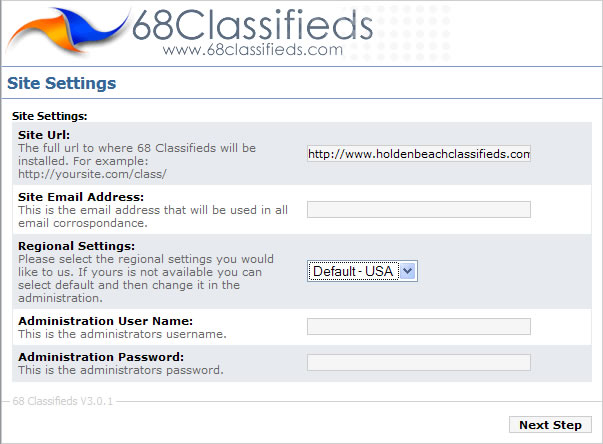
Site URL: Enter the location where you have installed the classifieds script (including the trailing slash "/"). If you have installed the site in a subfolder, enter the folder name after your site name (such as "http://www.yoursite.com/classifieds/").
Site Email address: Enter the address where you would like to be notified when someone places an ad or uses the 'Contact Us' form.
Regional Settings: Choose the appropriate settings for your location. If yours is not available, you can select 'Default' and then change it in administration afterwards.
Administration User Name: Enter the username you would like to use to log in to the administration area.
Administration Password: Enter the password you would like to use to log in to the administration area.
Click the 'Next Step' button.
The next page should indicate a successful installation.
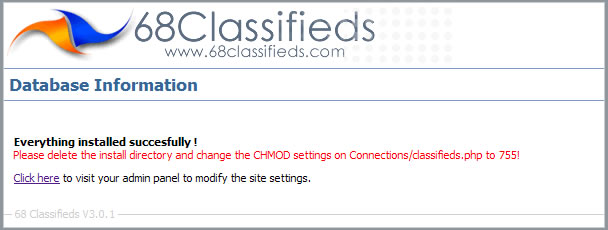
The final step after installation will be to COMPLETELY DELETE THE ENTIRE 'INSTALL' DIRECTORY. If this is not done, your site will not work correctly. Connect to your server with your FTP program and open your 'public_html' directory. You should see the 'install' directory listed. Highlight it and press your 'Delete' key. Confirm the deletion and verify that the 'install' directory has been completely removed.
Next, open your 'Connections' folder and right-click on the 'classifieds.php' file. Change the permissions to 644. Windows Explorer users: This will be "Owners - Read and write (no execute), Group - Read (No write, no execute), Public - Read (No write, no execute)"
CONGRATULATIONS! You have successfully installed 68 Classifieds!