A. Main Settings
-
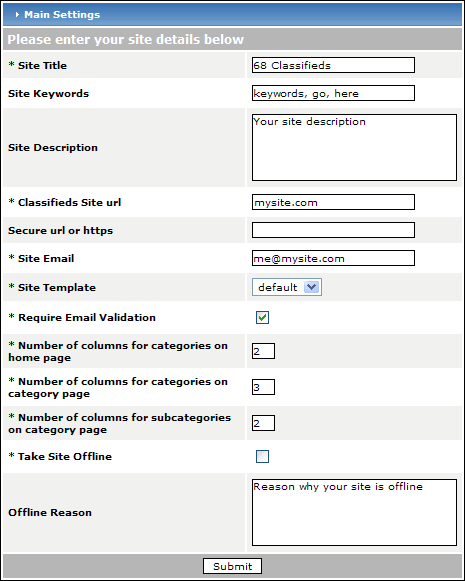
Site Title - The site title will appear in the title bar of the browser window.
-
Site Keywords - The keywords will appear in the page source and help search engine spiders catalog your site. Do not repeat words. Do not use more than 40-50 keywords.
-
Site Description - The description will appear in the page source and is similar in purpose to keywords.
-
Classifieds Site url - This is the location of your classifieds installation. An ending forward-slash (/) should be included.
-
Secure url or https - If you have purchased and installed an SSL certificate for your site or are able to use a shared certificate provided by your host, please enter it's location here. An ending forward-slash (/) is required.
-
Site Email - This is the address where you would like to receive all site-related email.
-
Use SMTP Server for email - Would you like to use a smtp server to send email? If not then php's mail() function will be used.
-
SMTP Server Address - The smtp server address.
-
SMTP Username - The smtp server username if required.
-
SMTP Password - The smtp server password if required.
-
SMTP Port - The smtp server port. If nothing is entered then the default port will be used.
-
Enable HTML Editor - Select yes if you would like to use TinyMCE when you are modifying the page content.
-
Site Template - If you have more than one template installed, you can select which template you would like to use. The classifieds script comes with one template named 'default'.
-
Require Email Validation - If this is checked, the member will receive an email after completing registration. A confirmation URL will be included in the email that the pending member needs to visit in order to confirm that the email address he/she provided was valid. IF the box is not checked, the member's registration becomes active upon the registration form's submission.
-
Number of columns for categories on home page - This value defines the number of columns to be used in the category table on all pages except the category page.
-
Number of columns for categories on category page - This value defines the number of columns to be used in the category table on the category page.
-
Number of columns for subcategories on category page - This value defines the number of subcategory columns on the category page.
-
Take Site Offline - If this box is checked, the functionality of your site is removed. In other words, the only page available for viewing is the home page - no navigation links will work. You can include a reason for the site being 'offline' in the next field.
-
Offline Reason - You can provide an explanation of why your site is offline in this field. HTML is accepted.
-
SUBMIT - Commit your changes to the main settings by pressing the 'Submit' button.
